



Dear Families,
We still are waiting for word on whether we will have to re-organize our classes. Once we know we will share details with affected families. Re-organization will take place Monday September 21st should it occur.
We welcome all families to our annual Open House on September 24th from 5:00 pm to 6:30pm. Come meet our amazing staff, and then enjoy pizza for dinner! Also that week will be our first Book Fair, from the 21st to the 25th. Schedules will come home with students next week.
Throwback hot lunch September 30th.....hotdog day! Hotdogs $2, order on SchoolDay.
Parents of children with medical conditions please return your forms to the school as soon as possible - see full details below.
Also see below for steps on how to report a student absent using the Safe Arrival system. Calling in and reporting your child absent will prevent calls from the school reporting them absent.
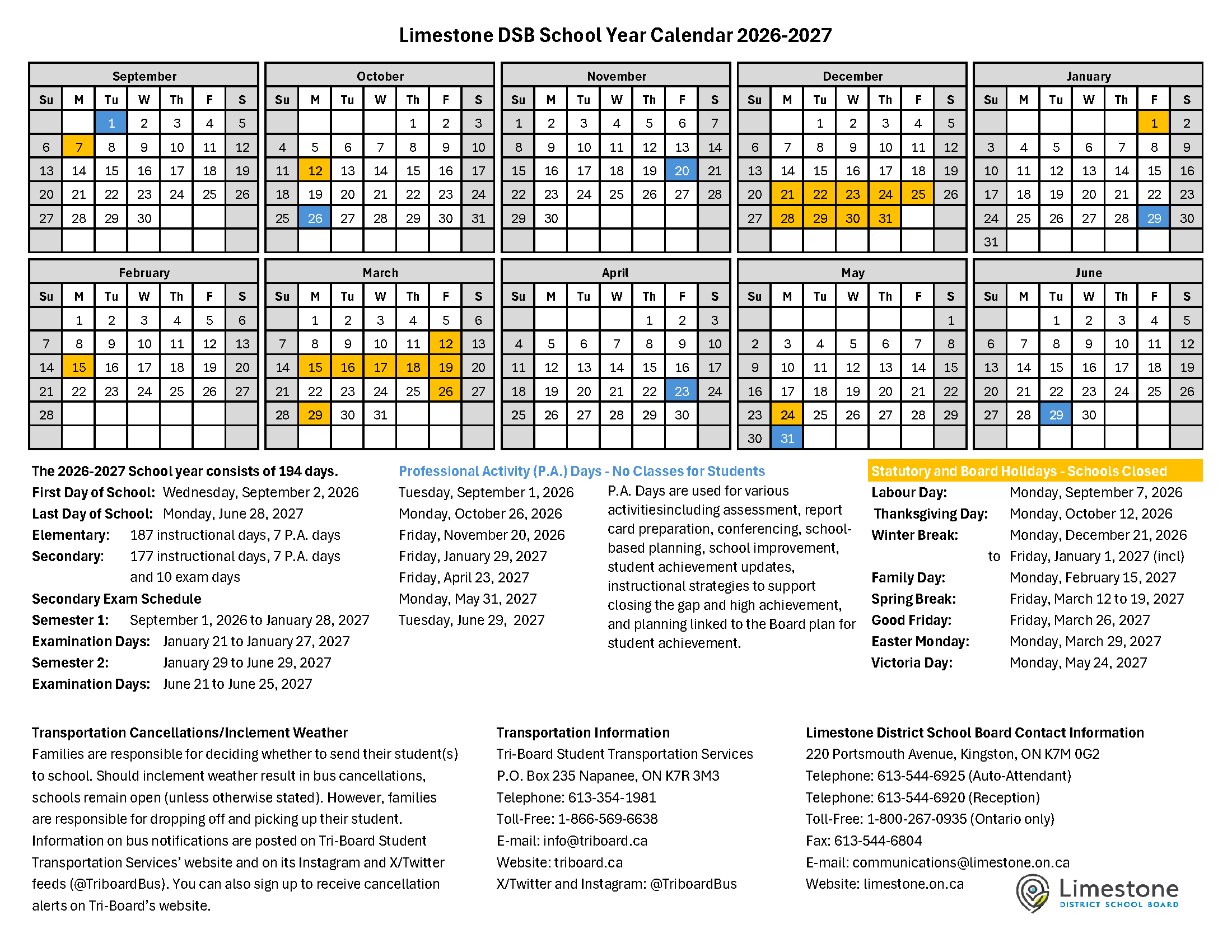
Below please read through the important information included below this message. Our regularly updated yearly calendar contains all upcoming events into the new year. Policies and procedures are also linked for your convenience.
Please reach out if you have questions or concerns,
Bill Dowling
DROP OFF AND PICK UP PROCEDURES
Students can be dropped off starting at 7:50 am when supervision begins. Between 7:50 am and 8:10 am when the bell rings, parents are to escort (if needed) their children to their designated line up spot on the yard, they do not need to be brought to the office. The map of these spots is below. These spots are supervised by school staff, but parents are welcome to stay until the bell.
After the entry bell at 8:10 am, students will need to enter through the front door and check in at the office, so they are marked as present for attendance. If parents enter with their children, we ask that they stop at the office and do not walk into the school. This allows us to ensure we know who enters and exits our building during what is an extremely busy time of day. Younger students will be escorted to class by office staff.
At dismissal, students can be met at their line-up spot/classroom door at the bell. Please do not come into the front foyer to wait as this area is used for staging students who take our early and front of school buses. If you are late, please come to the office as students not met at dismissal will be escorted to the office to wait for their families.
Should you need to pick up your child inside the school day, please send a note with your child to school if you would like them ready for a specific time. Or please call the school in advance of the pickup time so your child can be called down. Please remember that getting little ones into winter gear takes time! Outside of emergencies, please do not call the office to arrange for pick up after 2:00 pm, including inclement weather days. This is the busiest time of day for the office, and dismissal procedures have already begun for early buses. Calls during this time may not be answered in the usual quick manner as our lone office manager works to ensure everyone gets where they are supposed to go. As well, classes may be in gym, library, or outside, and finding a student may take time, time that just isn’t available during this busy 30 minutes.







REPORTING STUDENT ABSENCE
How to report an absence
In some instances, students may need to be away from school for illness, appointments or other events. Parents/caregivers can use the SafeArrival system to report a full day absence, an extended student absence and also a late arrival to school. When reporting an absence for a secondary student parents/caregivers will also be able to select an early departure. To report an absence, use one the following methods:
School Messenger application
- Use the email address you provided to the school.
- Use your mobile device to download and install the free SchoolMessenger blue app from the Apple App Store or the Google Play Store, the SchoolMessenger website portal, or from within the LDSB mobile app.
- Tap Sign Up to create your account. Please ensure you use the same email address your student’s school has on file. If you do not use that same email address, you will not be able to create an account, or may not be able to see the "Attendance" option. You may have already created an account when we introduced the Communicate broadcast system.
- Select Attendance from the menu, then select Report an Absence and follow the prompts.
SchoolMessenger SafeArrival website portal
- Use the e-mail address you provided to the school.
- Go to the website SchoolMessenger website portal.
- Click Sign Up to create your account. Please ensure you use the same email address your student’s school has on file. If you do not use that same email address, you will not be able to create an account, or may not be able to see the "Attendance" option. You may have already created an account when we introduced the Communicate broadcast system.
- Select Attendance from the menu, then select Report an Absence.
Interactive toll-free telephone
- Call 1-855-257-9349 toll-free to report an absence using the automated phone system.
- Follow the instructions to report an absence.
These options are available 24 hours a day, 7 days a week. For any school day in the school term up to the cut-off time on the day of the absence. Future absences can be reported at any time using any one of these methods.
Please do not call the school directly to report your student's absence.


Daily Schedule
Time | Activity/learning block |
|---|---|
7:50 a.m. | Yard supervision begins |
8:10 a.m. | Entry bell |
8:10 to 9:50 a.m. | 100-minute instructional period |
9:50 to 10:30 a.m. | Nutrition break |
10:00 to 10:30 a.m. | Recess |
10:30 a.m. to 12:10 p.m. | 100-minute instructional period |
12:10 to 12:30 p.m. | Nutrition break |
12:30 to 12:50 p.m. | Recess |
12:50 to 2:30 p.m. | 100-minute instructional period |
2:30 p.m. | Dismissal and bus loading |
TPCS Cell Phone Policy
Cell phone use by students impacts not only the learning environment but also the safety and privacy of others. In accordance with the Limestone District School Board’s Policy as well as the Ministry of Education’s Policy, students are not to be using cell phones at school unless they are directed to do so by their teacher for instructional purposes. As a staff, we have discussed why certain students may need to use their cell phones while at school and we will make sure we connect with those students and their parents to make a plan. We also want to highlight that if there needs to be any communication between home and school during the school day, this needs to go through the main office by calling 613-354-2121.hen your child arrives at school, they will be directed to put their device in a safe container in the classroom. If your child does not follow the expectations around cell phone use, their device will be housed in the office for the day. There will not be any warnings given. Your child will be able to pick it up at the end of the day. If their device is being misused again, a parent/guardian will be asked to come pick up the cell phone. This policy extends to the use of headphones/earbuds without direct permission from a teacher. Our goal is to make the most use of class time and create an effective, focused, and respectful learning environment for all students.
LDSB Student Dress Policy
The Limestone District School Board is committed to upholding human rights, and creating an equitable, inclusive, and accessible school climate that ensures all students and staff feel safe, comfortable, and accepted. Please review our updated Student Dress Policy using the attached document
Administrative Procedure 352 Student Clothing
Allergen Awareness - Nut-Free School
Thank you for packing nut-free snacks! Please communicate with teachers before sending any treats in for your student's class.
